
What is AppLaunchpad?
AppLaunchpad is a browser editor for App Store and Google Play screenshots. You pick a template, add your app captures, and customize the text, devices and graphics. Its Pro plan advertises 1,000+ templates, 10,000+ graphics, AI translation and scaling across device sizes. People also search for it as “app launch pad”.
If a big asset library and ready-made layouts are what you need, it’s a solid choice. An alternative makes sense when you want different billing, a simpler workflow, editing locally on a Mac, or exports that are actually free.
We make Minimalist Screens. Everything below comes from each tool’s published information and from our own product, checked on October 23, 2026. We didn’t test every tool hands-on.
Minimalist Screens vs AppLaunchpad
Go with Minimalist Screens if you want one straightforward kit at a one-time price. Stay with AppLaunchpad if its wider device support, template variety and translation workflow are a big part of your releases.
| What matters | AppLaunchpad | Minimalist Screens |
|---|---|---|
| Starting workflow | Pick a template and customize it in a drag-and-drop editor. | Upload your real app captures, choose a layout, then edit the captions, frames and backgrounds. |
| Template library | 10 templates on Free and 1,000+ on Pro, according to its pricing page. | A smaller set of layouts and styles. We don’t have anything like a 1,000-template library. |
| Free access | An ongoing $0 plan with limited assets and limited exports. The exact export limit isn’t published. | Create and preview for free, no account needed. Downloading a clean kit is paid. |
| Paid entry point | $10/month billed annually, so $120 for a year of Pro. Check the monthly billing option separately. | €2,99 for one kit. Subscriptions are optional. |
| Store sizes | Advertises automatic scaling for App Store and Google Play, iPad sizes included. | 1242 × 2688 px for the App Store and 1080 × 1920 px for Google Play. No iPad or 6.9-inch iPhone export yet. |
| AI assistance | Advertises AI translation on Pro and scaling across device sizes. | AI drafts the headlines. You edit the text and put the design together; it doesn’t generate the whole image. |
| Moving an existing project | Your editable design stays in AppLaunchpad. | Bring your original image files and copy your text over. There’s no AppLaunchpad importer, so layouts and editable layers need to be rebuilt. |
AppLaunchpad prices come from its official plans, ours from Minimalist Screens pricing. USD and EUR are different currencies. A one-time kit and a year of unlimited exports cover different amounts of work, so think about how many releases you actually make.
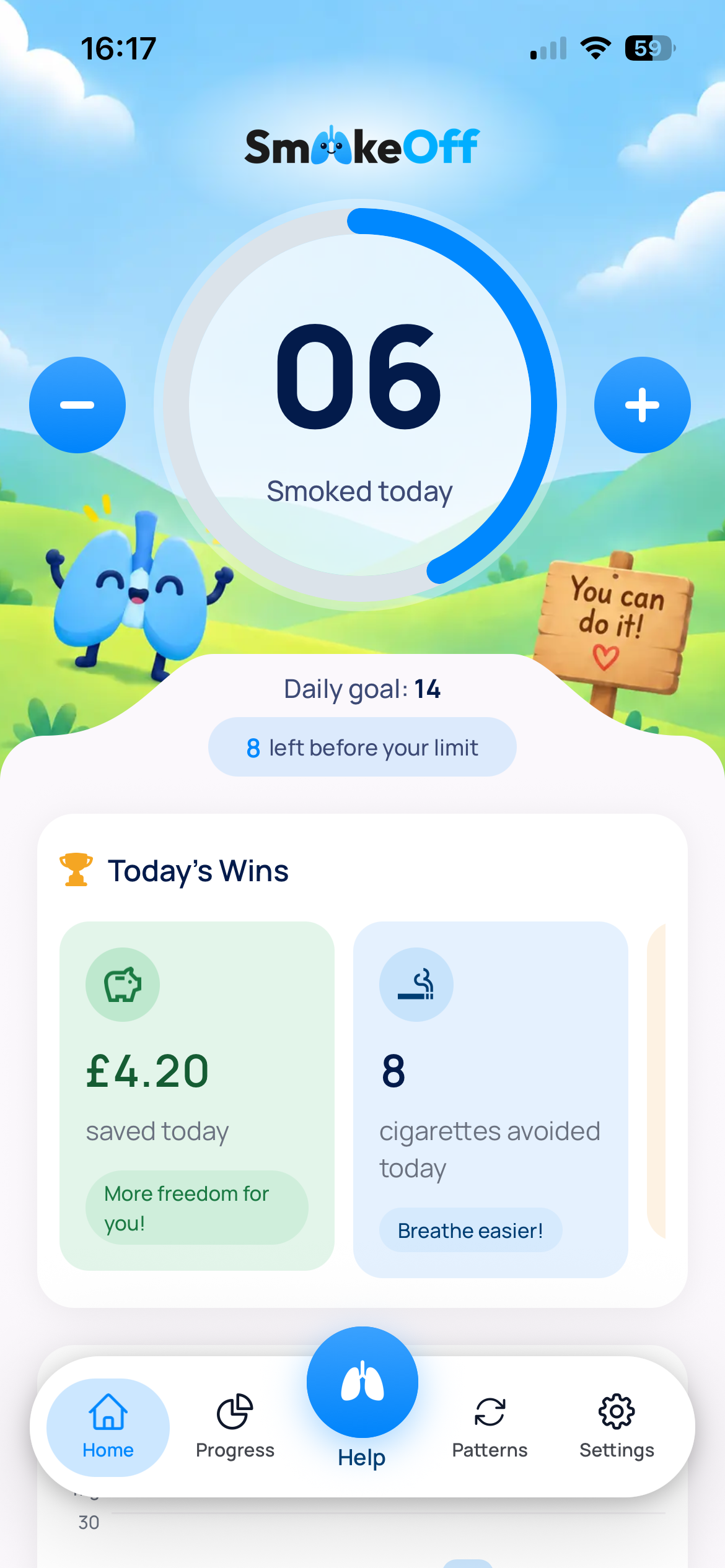
Here’s a real example: an app capture on its own, then the same capture with a headline, background and device frame.
.png)
Which AppLaunchpad alternative fits your workflow?
These five tools solve different problems. Look at export sizes and licensing first, then price. A free preview, a watermarked image and a clean commercial export are not the same thing.
| Alternative | Best fit | Price | Free access | Main trade-off |
|---|---|---|---|---|
| Minimalist Screens | One simple screenshot kit without a subscription | €2,99 per kit; Indie €199,90/year; Pro €499,90/year. Source | Create and preview without an account. Clean downloads are paid. | App Store export is 1242 × 2688 px and Google Play is 1080 × 1920 px. No 6.9-inch iPhone or iPad export yet. |
| AppScreens | Frequent releases, localization and direct store uploads | Pro $99/year; Scale $180/year, billed annually. Source | 1 saved project, up to 5 screens and essential iOS and Android exports. Previews of Pro features have watermarks. | Pro covers your own apps; for client work you need Scale. Free has no localization or premium export sizes. |
| Previewed | Panoramic mockups, 3D compositions and video exports | Plus $9.99 once for 10 high-resolution exports; Pro $228/year ($19/month billed annually). Source | Lite gives you unlimited 2D exports at 720p, under a CC Attribution licence. | The free 720p output may not match the store sizes you need. Plus and Pro include a commercial licence, so read its terms. |
| ButterKit | A native Mac workflow with Xcode and App Store Connect | Pro $10/month, $39/year or $79 once, at the current advertised prices. Source | Core tools and templates, with unlimited watermarked exports. | Needs macOS 26 or later, and Pro removes the watermark. Cloud translation runs on your own API key, so it can cost extra. Promotional prices can change. |
| AppMockUp Studio | A free browser editor without an account | Free, as advertised on its homepage. Source | App Store and Google Play screenshot design, no account needed. | Test the exact device sizes and export you need. The homepage doesn’t list detailed plans or service levels. |
Minimalist Screens
If you want one simple kit and no subscription, that’s what we built it for. Start from your real app captures, edit the headlines, and pick frames and backgrounds. AI can draft the copy for you. App Store export is 1242 × 2688 px and Google Play is 1080 × 1920 px. No 6.9-inch iPhone or iPad export yet.
AppScreens
The one to look at if you release often, localize a lot and want to upload straight to the stores. Paid plans add all device sizes, 80+ locales, AI captions and direct uploads to both stores. Pro covers your own apps; for client work you need Scale. Free has no localization or premium export sizes.
Previewed
Worth a look if you want panoramic mockups, 3D compositions or video exports. Move and rotate devices and text, and build panoramic sets, 3D mockups and videos. The free 720p output may not match the store sizes you need. Plus and Pro include a commercial licence, so read its terms.
ButterKit
Made for a native Mac workflow that connects Xcode and App Store Connect. Capture from the Xcode Simulator, link image folders, edit 3D devices and upload to App Store Connect. Needs macOS 26 or later, and Pro removes the watermark. Cloud translation runs on your own API key, so it can cost extra. Promotional prices can change.
AppMockUp Studio
If you just want a free browser editor with no account, start here. Templates, adjustable device frames, panoramic backgrounds and titles, all in the browser. Test the exact device sizes and export you need. The homepage doesn’t list detailed plans or service levels.
ButterKit’s $39/year and $79 lifetime prices are current offers, so they may change. Its product FAQ covers the macOS requirements and the extra cost of cloud translation. Previewed’s free exports are 720p, so check them against the store size you need.
Is AppLaunchpad free, and which alternatives export for free?
Yes. AppLaunchpad has an ongoing Free plan at $0, not just a time-limited trial. It includes 10 templates, selected graphics, fonts and layouts, with “limited exports”. Its pricing page doesn’t say how many. Pro is currently $10/month billed annually, so $120 a year. We couldn’t find a month-to-month price on that page.
- AppLaunchpad: before designing the rest, export one screen with the exact template, assets and size you plan to use. See its Free and Pro plans.
- Minimalist Screens: create and preview without paying or making an account. A clean download is €2,99 for one kit, or included in a subscription. See the free preview workflow.
- AppScreens: Free gives you one saved project with up to five screens, plus essential iOS and Android exports. Previews of Pro features have watermarks. Check the included sizes.
- AppMockUp Studio: advertises a free browser editor, no account needed. Try a full-resolution export for your target device. Open AppMockUp Studio.
- ButterKit and Previewed: ButterKit’s free exports have a watermark, and Previewed Lite limits 2D exports to 720p under an attribution licence. Check those limits before using either for your store listing.
Is AppLaunchpad good?
The best reasons to look at AppLaunchpad are its template variety, graphics and fonts, device coverage and the paid translation workflow. Its template gallery has categories for iPhone, iPad, Android, Mac and feature graphics. If you’d rather start from a design than build one from scratch, that helps.
The catch is fit. A ready-made layout saves time, but you still have to check that the text length, framing and controls work for your app. That’s true of any template-based tool, not just this one.
On Trustpilot, some reviewers mention unexpected export restrictions, editor problems and trouble getting support or refunds. They’re worth reading before you pay. They’re individual reports, though, and we haven’t reproduced those issues ourselves.
The best test is one complete screen: swap in your capture, write a longer headline, adjust the frame and export at the size you need. If that goes well and the billing works for you, there may be no reason to switch.
Can you switch from AppLaunchpad without starting over?
You keep your source material. Minimalist Screens accepts PNG, JPG and WebP app captures, and you can copy your headlines over. There’s no importer for editable AppLaunchpad projects, so text, device frames, backgrounds and layer positions have to be rebuilt in the new editor.
- Gather the originals. Keep the raw app captures, headlines, brand colors and any assets you have permission to reuse.
- Rebuild one screen. Upload an original capture in the App Store screenshot generator, choose a layout, then add the headline and frame.
- Check the result. Look at the free preview and the supported sizes before buying. Our screenshot size guide shows what your listing needs for each device.
- Finish the set. Apply the style to the rest of your screens, proofread the text and check each store export.
A finished AppLaunchpad export is a flat image. Uploading it won’t bring back editable text or remove the old device frame, and adding a new frame can give you a frame inside a frame. Use the original app capture instead. How long switching takes depends on your design, number of screens and languages.