

App Store Keyword Research Tool
Find relevant keywords for your iOS app. Explore search suggestions, compare popularity and competition, and choose what belongs in your next listing update.
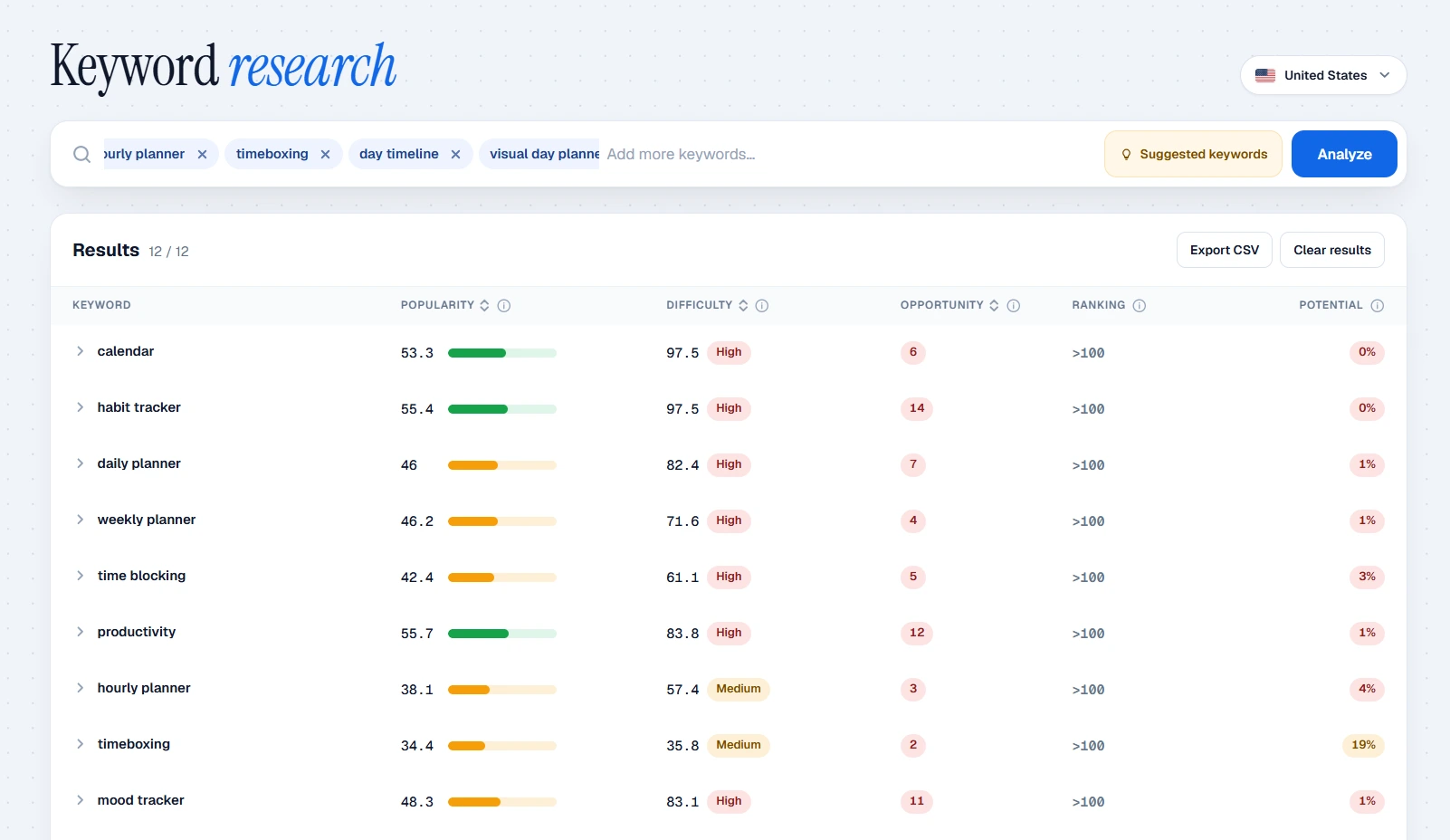
From a few words to a shortlist.
Pick your app and the country you want to rank in. Keywords behave differently in every storefront, so the research stays inside one market at a time.
Type a few phrases that describe what your app does. The tool adds suggestions from App Store autocomplete and from words that keep coming up in the titles of the apps already ranking for them.
Every keyword gets a popularity score, a difficulty score and your app’s current position. Keep the ones that match something your app really does and drop the rest, even when they look popular.
Follow the step-by-step App Store keyword research guide for a worked example.
Ready to write? Check your 100 characters with the keyword field optimizer, then follow the shortlist in the App Store rank tracker.
What the numbers tell you.
Popularity compares how often people search a term against other terms in the same country. With Apple Ads connected you see Apple’s own index where it exists; everywhere else it is our estimate, and the result says which one you are looking at. A score of 50 does not mean 50 searches a month.
Difficulty looks at how strong the apps in the top results are. A low score is a phrase worth a closer look. It does not promise you a top position.
Position shows where your app sits in the first 100 results today. Further down, the tool marks it as out of range.
Competitor titles are a good source of words for a feature. They tell you nothing about another app’s private keyword field, or which of its terms bring installs.
Turn research into a clearer listing.
Put your strongest terms in the app name and subtitle, written the way a person would read them. The keyword field takes the extra words, without repeating what is already there.
A running app with interval workouts might look at “interval timer” next to a broad term like “running”, then compare the local results before choosing.
Text is only part of how Apple ranks apps: downloads, ratings and reviews count too. After a release, look at your ranking history and at impressions in App Store Connect to see what actually moved. Apple’s search guidance explains the rest.
Built for indie iOS developers.
Minimalist Screens keeps keyword research, rank tracking and screenshot creation in one place, in your browser. You research the words for one country, track the ones you pick, and design the screenshots that carry them, without moving lists from one tool to another.
It covers the Apple App Store only. You can start on the Free plan, and when you need more research, more tracked keywords or a longer history, the paid plans raise those limits. Screenshot kits are included in the paid plans or can be bought one at a time.
See everything it does in the Minimalist Screens ASO tools.
Find the wordsyour next release needs.
Build a shortlist for your iOS app, one market at a time. The free plan needs an account, not a credit card.
Start keyword research freeApp Store keyword research FAQ
Tools, free access and what the numbers can tell you.
It depends on what you need around the research. Minimalist Screens is made for indie iOS developers who want keyword research, rank tracking and screenshot creation in one browser workflow, starting on a free plan. It covers the Apple App Store only. See what Minimalist Screens includes →
Yes. Minimalist Screens has a Free plan with 50 keyword analyses per month, 1 app, 10 tracked keyword-country combinations, 2 app-country pairs and 7 days of ranking history. A free account is required. You can also type seed terms directly into App Store search and collect its autocomplete suggestions for free. Suggestions give you ideas, not verified search counts. Start with a free account →
You can compare relative search popularity, but Apple does not publish exact monthly search counts for each App Store keyword. Apple Ads provides an official popularity index: its API documents a 1–100 scale, while its interface also uses 1–5 dots. Some keyword responses bottom out at 5. Connect Apple Ads to see official popularity where available in Minimalist Screens; values without direct Apple data can still be estimates. A score of 50 does not mean 50 searches or twice the searches of a score of 25.
Without direct Apple data, Minimalist Screens estimates popularity from public App Store signals. These include how early a term appears in autocomplete, its suggestion position and persistence, related suggestions, and the strength and title matches of apps in the search results. The model is calibrated against Apple popularity samples. Estimates are less precise than official Apple data, and less reliable when autocomplete is unavailable. Use them to compare a shortlist, not as measured search volume.
Yes. Apple says text relevance still includes your app name, subtitle, keyword field and primary category. ASO keyword research helps you choose relevant language for those fields. Downloads, ratings, reviews and other behavior also influence search results, so adding keywords alone does not guarantee a ranking improvement. Read Apple’s search guidance →
No. Minimalist Screens keyword research and keyword rank tracking currently support the Apple App Store for iOS apps. The screenshot generator supports Google Play, but that does not include Android keyword research.
Yes. AI can help brainstorm phrases from your app’s features and audience, but an LLM suggestion does not prove that people search for a term. Minimalist Screens keyword suggestions come from App Store autocomplete and recurring phrases in competitor titles, with an additional Apple Ads source when connected. Review each idea against local search results and your app’s features before using it. Do not copy competitor brand names into your keyword field.